How To Install
Automatic Install
- Open this website directly in Houdini in a
Help Browserview and clicking the rainbow button will automatically install it. - Or click the button now and paste it to
Houdini > Window > Python Source Editor > Accept
It will download and put the files in the right places, all you have to do is restart Houdini.
Here is what the script does exactly:
- Download the latest release from Github
- Extract its content to the Houdini prefs folder
- Modify the file
REGNAREB.jsonto add the path to this tool folder - Move the json file in the
packagesfolder of your Houdini preferences folder
If everything works fine, it should show that window on the next start of Houdini:
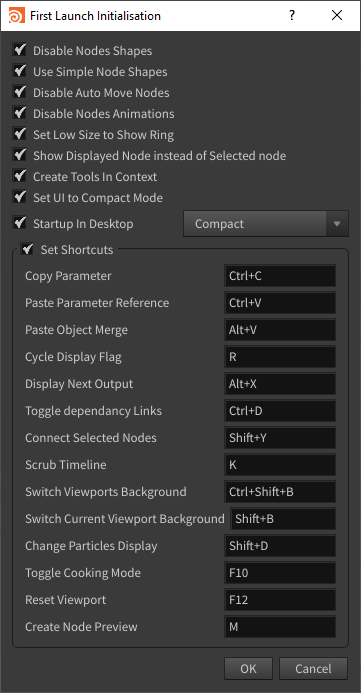
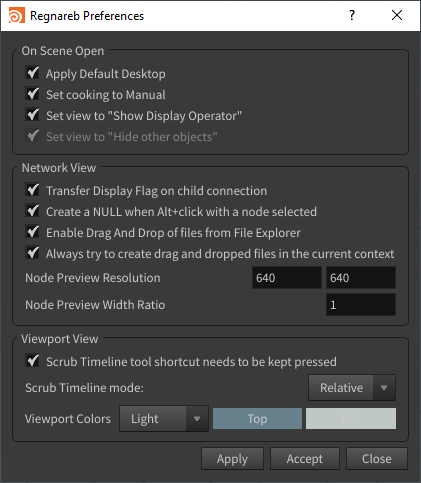
For more tool preferences, activate the Regnareb shelf and press the Preferences button.
You can also auto-update the tools by clicking the Update button in the shelf.
How to Uninstall
Just remove the REGNAREB.json in the packages folder in your houdini preferences folder.
You can also remove the REGNAREB-TOOLS folder but if the json is not in the packages folder this folder does nothing.
For Developpers
You can download the code by doing (as admin for symlinks):
git clone --recurse-submodules -c core.symlinks=true --remote-submodules https://github.com/Regnareb/Houdini.git